Ping VPN
- 4.9
- Rating
- 10.00M
- Installs
- Free
- Price

 Analysis by App-foxy
Ping VPN is the kind of tools app I would keep around for specific moments rather than leave running without a second thought. It is free, aimed at Everyone, and built by F2P, with a simple purpose: give my connection a VPN layer when I want more privacy on an unfamiliar network or need to try a different route to the internet. That straightforward role is also its main appeal. I do not have to learn a complicated security suite before using it.
After spending time with it, my impression is that Ping VPN works best as a quick, repeatable connection tool. I can open it when I sit down at a café, connect before checking an account, and disconnect when I return to a trusted home network. It is less convincing as a complete privacy strategy or as a replacement for a premium VPN service with a broad set of clearly documented controls.
How Ping VPN fits into a normal day
My baseline routine with a VPN is deliberately simple. I first decide whether the network deserves extra caution. A personal mobile connection or a familiar home router usually does not need the same treatment as an open café hotspot, a hotel network, or shared Wi-Fi in a waiting room. In those less familiar places, I open Ping VPN before browsing, messaging, or signing into anything sensitive.
You May Also Like

 Blood Strike: 2.5 Anniversary
Blood Strike’s Loadouts Turn Every Drop Into a Tactical Gamble
A close look at Blood Strike’s custom loadouts: how fast access to signature weapons reshapes its battle royale rhythm, rewards preparation, and narrows the gap between fights.

 Pandora - Music & Podcasts
Pandora’s Music Is Easy to Start, but Harder to Recover
Pandora’s strength is its low-effort path from a seed to a station. Its weak spot is how much confidence it asks you to place in connection, setup, and quiet recovery.

 8 Ball Pool
 Is Built on Rivalries, Rematches, and Routine
A close look at the rivalries, rematches, shared routines, and unanswered safety questions that turn a quick pool match into a persistent mobile community.

 Samsung Music
’s Quiet Strength Is Playing What You Already Own
Its reach comes less from spectacle than from dependable access to a personal library. That simplicity is both the app’s strongest retention engine and its ceiling.

 AccuWeather: Weather Radar
AccuWeather Review: A Quick, Clear Forecast for Everyday Decisions
For everyday plans, the best forecast is the one you can understand quickly. AccuWeather makes rain timing, radar, and local conditions easy to act on, with a few trade-offs.

 Hill Climb Racing
Why Hill Climb Racing Still Turns Crashes Into One More Run
A tiny car, a bumpy hill and one more upgrade: Hill Climb Racing keeps resurfacing because its simple chaos makes every near-miss feel personal.
More From Our News Desk



That order matters. Connecting only after opening a banking page or an email account defeats the habit I am trying to build. I prefer to establish the VPN connection first, wait until the app shows that it is active, and then start the session I actually care about. When I finish, I disconnect rather than assuming the protection will remain useful forever.
A realistic example is working from a public library. I might join the library Wi-Fi, launch Ping VPN, and then download documents from a cloud account or send a work message. I would still use strong passwords and multi-factor authentication, but the VPN becomes one extra layer between my device and the local network. When I leave, I turn it off and avoid carrying that connection into unrelated browsing.
This is a small workflow, but it is more useful than treating a VPN as a magic privacy button. It does not make suspicious websites safe, remove tracking from every app, or protect me from entering information into a fake login page. I still need to check the address of a website, keep Android updated, and avoid installing unknown files. Ping VPN is one part of a cautious routine, not the whole routine.
The app’s reach suggests that this uncomplicated approach appeals to many people. It has passed one million installs and holds a five-star average from roughly nineteen thousand ratings. Those figures tell me that the basic experience is approachable, although they do not remove the need to judge whether its controls match my own expectations.
Because it is free, Ping VPN is easy to try without making a financial commitment. That is helpful for someone who only needs occasional protection and does not want to subscribe immediately. The trade-off is that I would not choose it automatically for demanding work, long travel, or situations where I need a carefully documented service with extensive server and account controls.
The first connection is only the beginning
When I install a VPN, I do not judge it only by whether the connection button works. I also watch how it fits into my habits. Can I remember to use it? Does it interrupt the task I am doing? Do I understand when it is active? With Ping VPN, the most sensible approach is to keep the process visible and intentional instead of connecting once and forgetting about it.
I also avoid assuming that a VPN automatically improves speed. Routing traffic through another service can introduce delay, and the result can vary with the network I am using. For ordinary browsing, that may be acceptable. For a video call, a large upload, or an online game, I would compare the experience with and without the connection before blaming the app or my internet provider.
That comparison is one of the most practical habits experienced users develop. If a page suddenly loads slowly, I disconnect briefly and test the same page again. If the problem disappears, I know the VPN route may be involved. I can then decide whether privacy is more important than speed for that task, rather than leaving the VPN enabled and guessing.
Settings and choices worth checking before relying on it
Ping VPN presents itself as a focused utility, so I would spend a few minutes reviewing whatever connection choices and system prompts appear during setup instead of tapping through them automatically. The important question is not simply “is it connected?” but “do I understand what my phone is routing through it right now?” That distinction prevents careless use.
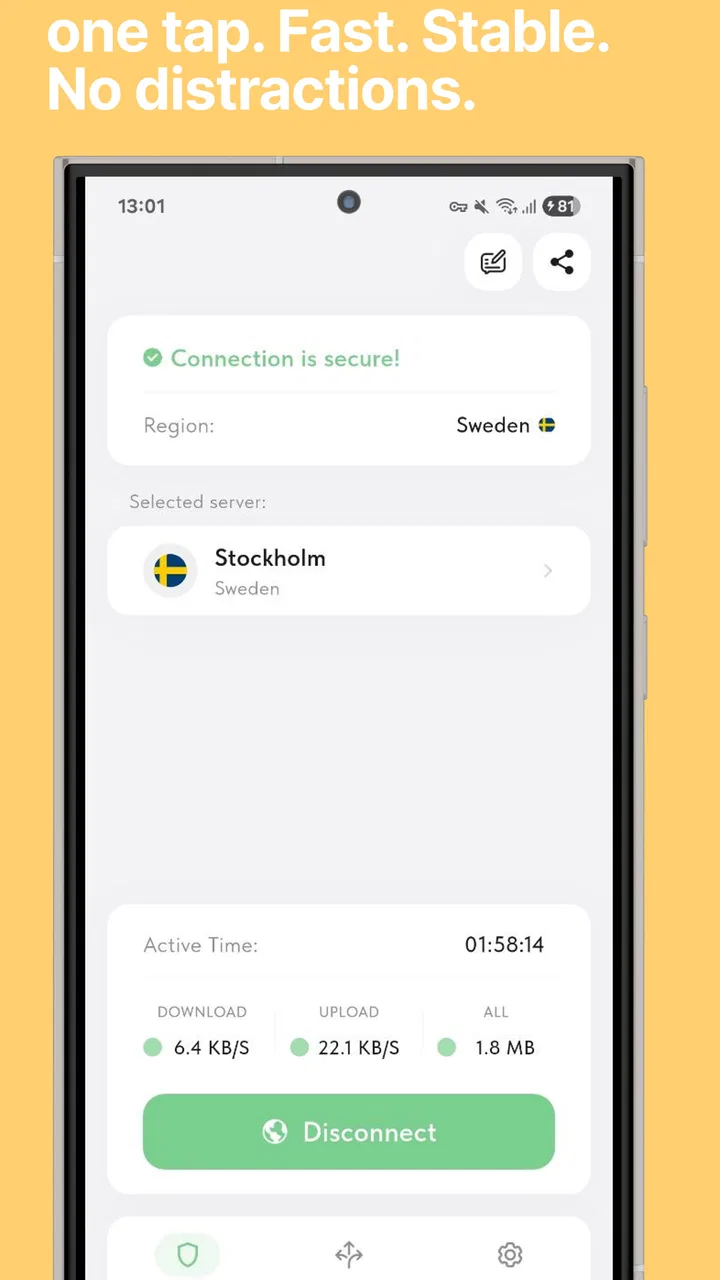
On Android, the operating system may display a VPN indicator or request permission to create a VPN connection. I treat that prompt seriously. A VPN can handle a large portion of my device’s internet traffic, so I do not grant access casually to random apps. With Ping VPN, I would read the system confirmation, check that the app name is the one I intended to install, and then look for the active VPN indicator after connecting.
I also check the app’s current build before forming a long-term opinion. The current version is 1.1.16, and the app supports Android 7.0 and later. That broad compatibility is useful if I am working with an older phone, but an older operating system can have its own security weaknesses. A VPN should not be used as an excuse to postpone system updates when my device can receive them.
One setting-related habit I recommend is testing the app on both Wi-Fi and mobile data. A connection that behaves well on one network may feel different on another because of congestion, filtering, or the distance to the service handling the traffic. I would test a normal website, a messaging app, and a short media stream, then note whether the connection remains practical for my everyday use.
Another useful check is battery behavior. I would not invent a battery estimate from a single afternoon, because background networking, screen brightness, signal strength, and other apps can distort the result. Instead, I would use Ping VPN during a normal day and watch whether the phone becomes noticeably warmer or loses charge faster. If it does, I would reserve it for public networks rather than keeping it active all day.
I also pay attention to apps that do not behave well through a VPN. Some services use location, network identity, or regional checks and may ask me to verify myself again. A workplace tool might reject a connection that appears to come from an unfamiliar route. That does not necessarily mean Ping VPN is broken, but it does mean I should know how to disconnect temporarily and retry the task normally.
A VPN connection is not the same thing as anonymity. The service handling the connection may still be involved in the path between my device and the destination, and websites can identify me through accounts, cookies, browser settings, or other signals. I would never use Ping VPN as permission to ignore the privacy practices of the sites and apps I visit.
Small checks that prevent bigger confusion
Before a trip, I would connect at home and make sure I understand the app’s basic flow. That way I am not trying to troubleshoot a new VPN while standing outside an airport or hotel. I would also keep an alternative connection method available, such as mobile data, because a VPN should not become the only way I can reach an important account.
If a site refuses to load, my troubleshooting order would be simple: check whether the internet works without the VPN, reconnect once, try a different network, and disconnect if the service remains incompatible. Repeatedly tapping the same button is rarely a useful diagnosis. This approach also helps me separate a local Wi-Fi problem from a VPN routing problem.
I would not install several VPN apps and switch between them randomly. Multiple VPN profiles can make it harder to know which service is active, and a second app may compete for the same Android connection permission. Ping VPN is easier to evaluate when it is the only VPN tool I am testing at that time.
Faster patterns for people who use it repeatedly
The best improvement is not a hidden trick; it is reducing the number of decisions I make each time. I choose a few clear moments when Ping VPN is part of my routine: joining unfamiliar public Wi-Fi, handling sensitive accounts away from home, and using a network whose owner I do not fully trust. I do not connect merely because the app is installed.
I also create a start-and-stop rule. My start rule is “connect before signing in.” My stop rule is “disconnect when I leave the public network or finish the sensitive task.” These rules are easier to remember than a vague promise to use a VPN more often. They also reduce the chance that I will forget it is active during a later activity that needs a stable connection.
For frequent use, I keep the app easy to reach on my phone. I do not need to open it repeatedly during a single session, but I do want quick access when moving between networks. Android’s own notification and system VPN indicators are useful here because they give me a second visual check instead of forcing me to rely only on memory.
A practical pattern is to connect before opening a group of related apps. For example, during a café work session I might connect first, then check email, use a document service, and send messages. When I finish, I disconnect before switching to entertainment or downloading a large file. This keeps the VPN tied to a purpose and makes unusual slowdowns easier to identify.
I would also avoid changing several variables at once. If I move from Wi-Fi to mobile data, change a VPN option, and restart an app simultaneously, I will not know what solved the problem. Experienced use is often less about advanced controls and more about controlled testing. Change one thing, repeat the same task, and keep the setup that behaves reliably.
Ping VPN’s free availability makes this kind of trial practical. I can test it during the situations that matter to me without first deciding whether a subscription is worthwhile. Still, free access should not encourage me to treat the service as disposable when I am handling important information. I would read the app’s current disclosures and permissions carefully and make my comfort level part of the decision.
Where a usual alternative may be better
Compared with using no VPN at all, Ping VPN gives me a more deliberate privacy workflow on shared networks. Compared with a paid VPN designed for power users, its attraction is simplicity and zero purchase cost rather than a long list of specialized controls. If I need a known location for testing a website, detailed server selection, a polished multi-device setup, or extensive support, I would look at a more established paid alternative in that category.
On the other hand, a complicated service can be the wrong choice for a family member who only wants a clear connect button. In that case, Ping VPN may be easier to explain and easier to remember. The right choice depends on whether the person values a short learning curve or needs deep control over routing, locations, and account management.
I would also skip it for activities where a VPN is not the central solution. If my goal is to block advertising trackers, I need tools designed for that job. If I want secure file storage, I need encrypted storage. If I am trying to protect an account, a unique password and multi-factor authentication remain essential. Adding a VPN does not replace those measures.
Advanced limits I would keep in mind
The biggest limitation is the gap between a simple VPN app and a fully documented privacy service. A connect button can be useful, but serious users may want detailed information about locations, protocols, logging practices, leak protection, automatic behavior, and support. I would not assume those capabilities simply because the app calls itself a VPN.
That matters especially when I am traveling or working with confidential material. A casual public Wi-Fi session and a professional workflow involving private client documents are not equal risks. For the latter, I would prefer a service whose technical details, policies, and administrative controls I have examined carefully, possibly alongside an employer-approved solution.
There is also a performance limit. The fastest connection is not always the most private-feeling connection, and the most private setup is not necessarily the most convenient. A VPN can affect latency, streaming behavior, login checks, and downloads. I would not use Ping VPN during a time-critical video call unless I had already tested it on the same kind of network.
Location-sensitive services deserve special caution. A VPN may make a website or app interpret my connection differently from my physical location, which can trigger security checks or change available content. I would not use it to assume that every regional restriction will disappear, and I would be prepared to disconnect if an important service stops recognizing my normal access pattern.
Older devices require a balanced view too. Support for Android 7.0 and later makes Ping VPN available to many phones, but compatibility is not the same as modern device security. If my phone no longer receives security updates, I would consider replacing it rather than relying on a VPN to compensate. Network privacy cannot repair weaknesses in the operating system itself.
The app is rated for Everyone, which makes its basic audience broad, but that should not be confused with “safe for every online decision.” I would still teach younger users not to share passwords, click suspicious links, or install files from unknown sources. The VPN can protect a connection path; it cannot judge every destination for them.
Finally, I would keep an eye on practical friction. If the app requires repeated reconnects, interferes with services I use daily, or makes the phone noticeably slower, I would not force it into my routine. A security tool that I constantly disable is not doing much for me. Reliability and understanding matter more than having a VPN icon on the screen.
My verdict after building a repeatable habit
Ping VPN makes the most sense to me as a free, accessible utility for occasional protection on networks I do not trust completely. Its strongest quality is that it can fit into a simple habit: connect before sensitive browsing, check that the system shows an active VPN, use the network normally, and disconnect when the situation ends. That is a realistic benefit for people who might otherwise use no VPN at all.
I like that the app belongs in the tools category rather than pretending to solve every privacy problem. I can recommend it to a friend who wants a straightforward starting point, uses Android 7.0 or newer, and understands that a VPN is only one layer of security. The developer is F2P, and the app’s broad adoption gives it a level of visibility that makes it easy to consider, while the free price removes the initial barrier to testing it.
I would be more cautious with someone who needs advanced location control, professional administration, highly detailed privacy documentation, or dependable performance for demanding work. That person should compare Ping VPN with a specialist paid service instead of assuming that a simple interface covers every advanced requirement.
My final recommendation is therefore conditional but positive. Install it if your main need is a quick VPN connection for public Wi-Fi and occasional privacy-conscious browsing. Test it on the networks and apps you actually use, learn how to recognize when it is active, and keep a fallback connection available. Use Ping VPN as a practical layer in a broader security routine, not as a promise of total anonymity. With that expectation, it is an easy app to try and a reasonable fit for everyday, low-complexity VPN use.
FAQs for Ping VPN
01What platforms is Ping VPN available on?
Ping VPN is available on both Android and iOS platforms. Users can download the app from the Google Play Store for Android devices or from the Apple App Store for iOS devices. It offers a seamless experience with a user-friendly interface tailored to each operating system's unique features and requirements.
02Is Ping VPN secure for online activities?
Yes, Ping VPN prioritizes user security by employing advanced encryption protocols to protect your data. It ensures that your online activities remain private and secure, safeguarding against potential threats such as hackers and data breaches. Always check for updates to maintain optimal security features.
03Does Ping VPN affect internet speed?
While using a VPN can sometimes reduce internet speed due to encryption processes, Ping VPN is optimized to minimize speed loss. It employs high-speed servers and smart routing techniques to ensure that users experience minimal impact on their browsing speeds, maintaining a smooth online experience.
04Is there a free version of Ping VPN?
Ping VPN offers a free version with limited features, allowing users to try the service before committing to a subscription. The free version may have restrictions on server access and data usage. For full features and unrestricted access, users can upgrade to a premium subscription.
05How easy is it to use Ping VPN for beginners?
Ping VPN is designed with an intuitive interface that makes it easy for beginners to use. The setup process is straightforward, and the app provides clear instructions and helpful tips. Users can connect to a VPN server with just a few taps, making it accessible even for those new to VPNs.
Pros
- Fast connection speeds for streaming.
- User-friendly interface for all ages.
- Strong encryption for privacy protection.
- Supports multiple devices simultaneously.
- No logging of user activity.
Cons
- Limited server locations compared to rivals.
- Occasional connection drops.
- Free version has data limits.
- No live customer support chat.
- Mobile app lacks advanced settings.

Ping VPN
Gallery